Posted on Leave a comment

6 Practice Items I Actually Use

This article is written by Toru Hoshino, a jazz bassist and instructor based in Japan who teaches online lessons to students worldwide. In this article, he recommends six items that make practicing and managing your gear easier.

Here are some genuinely useful items I’ve personally used a lot for practicing bass and keeping my gear organized.

An Add-On Backpack for Your Gig Bag

My favorite find of the year: “BAG ON BAG,” an add-on bag that clips right onto a gig bag. Genuinely useful when you’ve got a lot of extra stuff to carry along with your bass or guitar — even a bandmate of mine said “maybe I should get one of these too” after seeing it.

A Wall Mount for Your Bass

Another find from this year. It installs with just a couple of small stapler-style pins, so even in a rental apartment, you can mount your bass on the wall. I’ve got three of these set up at home. The pin holes are tiny enough that they’re not an issue even when you move out.

iReal Pro

I’ve used this one for over ten years now. iReal Pro is an app that plays backing tracks for commonly played jazz tunes, and it’s incredibly useful for practicing walking bass and improvised solos. It’s paid, but it’s a one-time purchase you’ll use forever.

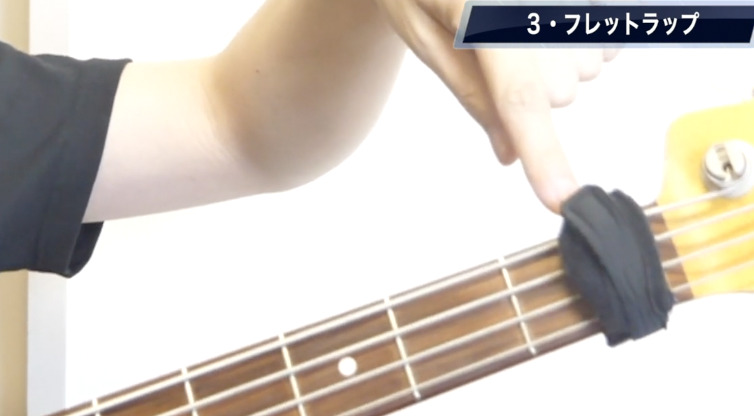
Fret Wraps

Another long-time staple of mine. It’s like a wristband you wrap around the nut area of an electric bass. It cuts down on open-string sustain, which is genuinely useful if you play a lot of walking bass that relies on open strings.

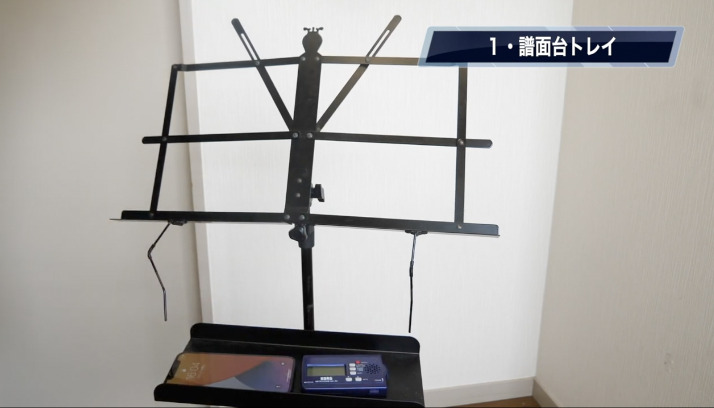
A Music Stand Tray

An attachment for your music stand that gives you a small surface to set things on — your phone, a metronome, a pen, all the small stuff.

https://amzn.asia/d/6g7nKhn

Compressed Air Duster

Not a music-specific item, but a standard compressed air duster. A quick spray clears dust off your pickups, which makes it a genuinely handy thing to have around.

That’s six recommended items for making your bass practice and gear management easier.

Good gear takes care of the small annoyances — but the thing that actually moves your playing forward is someone checking your progress regularly, which is exactly what a teacher provides.

Want Personalized Feedback on Your Playing?

This is exactly the kind of thing that’s hard to fix alone — and where having a teacher makes all the difference.

At Line on Bass, I offer an online lesson service where you send me a video of your playing, and I give you specific, detailed feedback — every single day if you want.

Students from around the world are using this to fix exactly these kinds of issues and steadily improve their jazz bass skills.

Check Out the Lesson Service →

Posted on Leave a comment

I Put a Rain Cover on My Bass Case and Biked 20 Minutes in the Rain

This article is written by Toru Hoshino, a jazz bassist and instructor based in Japan who teaches online lessons to students worldwide. In this article, he puts a rain cover on his bass case and bikes through the rain for 20 minutes to see if it actually works.

For this one, I put a rain cover on my bass case and biked for 20 minutes in the rain, to test whether the case stayed dry.

Spoiler: the bass came out completely fine. Here’s the full process, from putting the cover on to arriving at the destination.

Putting the Rain Cover On

Getting set up:

It’s generously sized, so it covers the case with plenty of room to spare: 385(w) x 1220(H) x 70(D) mm.

And off I go.

20 Minutes of Biking in the Rain — Arrived at the Studio

Made it to the studio. The outside is, naturally, soaked.

And on the inside…

Completely dry. Great job, rain cover.

Once You’re Done With It

Once you’re done using it:

Roll it up,

and it packs down small.

Small enough to fit right into your case.

Noah’sark Rain Coat NRC-Bass (Rain Cover for Electric Bass Cases)

The “Noah’sark Rain Coat” was built to protect your precious instrument from rain — the natural enemy of carrying a guitar or bass around. It’s designed to slip entirely over a gig bag or hard case and is easy to put on and take off. There’s a waterproof zipper section right where the case handle is, so you can pull the handle through and carry the case as normal. If you’re using it with the “Noah’sark Semi Hard Case,” you can even wear it on your back with the double shoulder strap while the cover is still on. When you’re not using it, it folds down small enough to tuck right into your case’s pocket. Bass size (BSH): 385(w) x 1220(H) x 70(D) mm

(Product description quoted from Amazon — note: the listing says “guitar,” but this is the bass version.)

Find it here: https://amzn.asia/d/85p004l

Sudden rain catches you off guard precisely because you never have a rain cover on hand for it. Well worth having, just to protect an instrument and case you care about.

Update, July 2025

Since writing this, I’ve also tried out a few rain covers from other manufacturers, including some newer brands. All of them had solid water resistance and felt genuinely good to use.

I’ve also covered how they feel in actual use on video, if you’re curious.

Keeping your gear dry is one problem solved — knowing exactly what to work on once you sit down to actually practice is a different one, and that’s exactly where a teacher helps.

Want Personalized Feedback on Your Playing?

This is exactly the kind of thing that’s hard to fix alone — and where having a teacher makes all the difference.

At Line on Bass, I offer an online lesson service where you send me a video of your playing, and I give you specific, detailed feedback — every single day if you want.

Students from around the world are using this to fix exactly these kinds of issues and steadily improve their jazz bass skills.

Check Out the Lesson Service →

Posted on Leave a comment

A Free, Easy Notation Software I’ve Used for Years: MuseScore

This article is written by Toru Hoshino, a jazz bassist and instructor based in Japan who teaches online lessons to students worldwide. In this article, he recommends the free notation software he’s used for years.

One question I get a lot is: “What notation software do you use?” Here’s my answer, along with what I like about it.

The software I use is called MuseScore.

It’s free on both Mac and Windows, and I’ve used it for years. It’s apparently usable from phones and tablets too, but I mainly work with it on a PC.

Here are the three things I like most about it:

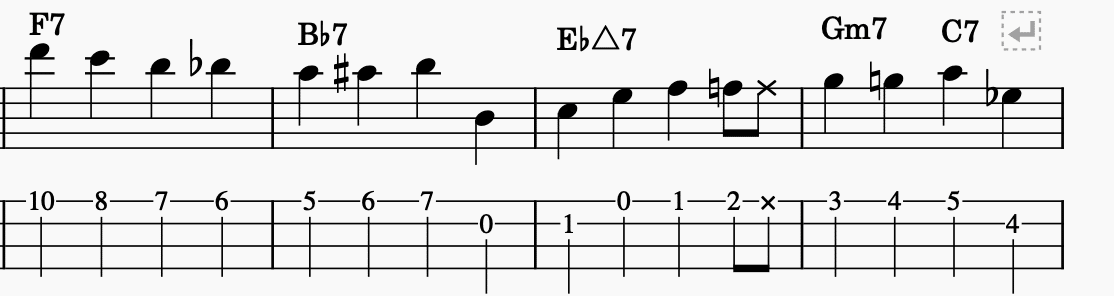
1. Automatic tab conversion
2. Playback of whatever you write
3. Choice of instrument tone for playback

1. Automatic Tab Conversion

MuseScore automatically converting standard notation to bass tab

Whatever bass line you input gets automatically converted into tab. Input a C note, for example, and it automatically maps it to the 5th fret on the 3rd string for you.

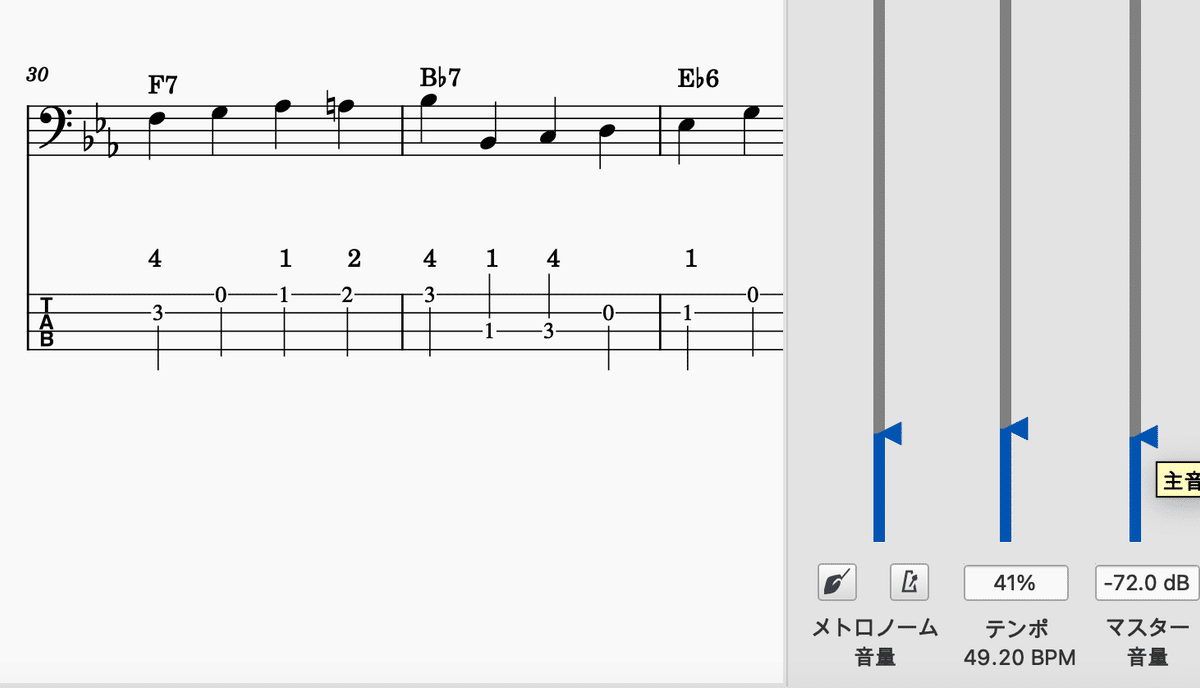
2. Playback of Whatever You Write

MuseScore's playback interface

Whatever you write can be played back instantly, so you can check how a phrase or bass line feels without having your instrument in hand.

I also like that you can input chords and have the chord backing play back with one click.

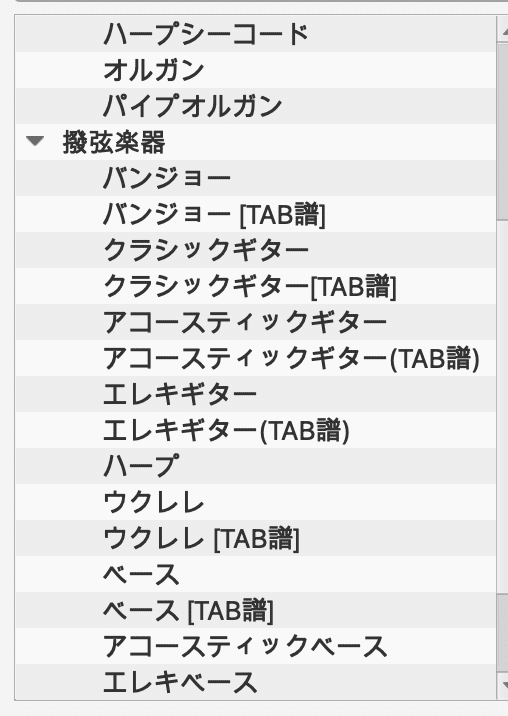
3. Choice of Instrument Tone

You can also pick the playback tone by instrument — piano, bass, guitar, and so on. For bass specifically, you can choose between electric and upright tone.

MuseScore's instrument tone selection menu

Every piece of sheet music I publish on YouTube is made with this software. Since it’s free, if you’re on the hunt for good notation software, it’s well worth trying.

Get MuseScore here: https://musescore.org/en

Writing out your own bass lines is great practice — having someone check whether what you wrote actually works musically is exactly where a teacher comes in.

Want Personalized Feedback on Your Playing?

This is exactly the kind of thing that’s hard to fix alone — and where having a teacher makes all the difference.

At Line on Bass, I offer an online lesson service where you send me a video of your playing, and I give you specific, detailed feedback — every single day if you want.

Students from around the world are using this to fix exactly these kinds of issues and steadily improve their jazz bass skills.

Check Out the Lesson Service →

Posted on Leave a comment

7 Practice Gadgets Worth Trying When You Need a Change of Pace

This article is written by Toru Hoshino, a jazz bassist and instructor based in Japan who teaches online lessons to students worldwide. In this article, he recommends seven practice gadgets worth trying when you need a change of pace.

1. A Ukulele Bass

The first time I saw one of these, I thought “wait, this exists?” It’s a compact bass with an acoustic-style build — perfect when you want to play quietly and casually. Affordable too, and great for quick practice sessions or just changing things up.

2. “CamScanner” for Organizing Sheet Music

If your sheet music pile is getting out of control, this is for you. It lets you manage all your paper sheet music from your phone or iPad in one place. It’s free, so if you use a tablet, it’s worth trying.

3. “Bag on Bag”

An add-on bag that clips onto your gig bag in one motion. Handy for carrying a change of clothes or small items for the studio without extra hassle.

4. Headphone Covers

These protect the headphones you use for practice, helping prevent the foam from cracking and extending their life.

https://amzn.asia/d/hTPvJy7

5. String Cleaner: “String Life”

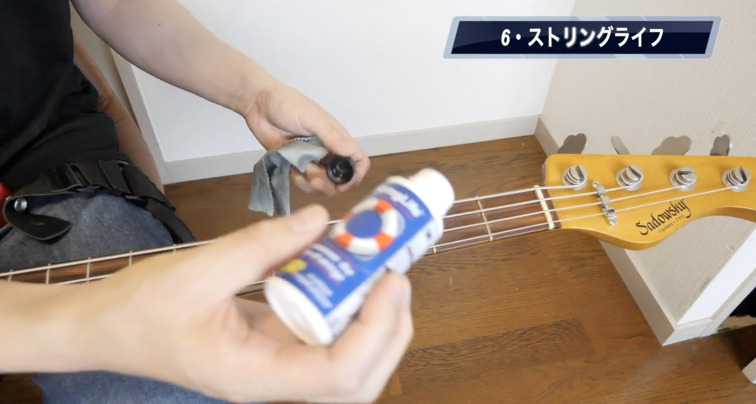
A cleaner you apply to your strings to slow down their degradation. With string prices on the rise, this is a great way to keep your tone fresh without burning through cash.

https://amzn.asia/d/7XB6gdG

6. A Bass Wall Mount

A wall mount you can install with just a couple of screws to hang your bass up. Works fine in a rental apartment too, and it’s sturdy.

A Rain Cover for Your Bass

Stay worry-free even in the rain — this is a dedicated rain cover that goes over your whole case. It protects your case from rain and humidity, making it a solid ally when you’re transporting a bass you care about. Great for biking or walking to lessons or rehearsal without worrying about getting soaked.

  • Highly water-resistant, protects your case fully
  • Folds up small for easy carrying
  • Great for biking or walking

That’s seven practice gadgets worth trying when you want a little change of pace. Add a bit of variety to your daily routine and keep things fun.

Gadgets like these make practice more enjoyable — but real progress comes from someone who can tell you exactly what to work on next.

Want Personalized Feedback on Your Playing?

This is exactly the kind of thing that’s hard to fix alone — and where having a teacher makes all the difference.

At Line on Bass, I offer an online lesson service where you send me a video of your playing, and I give you specific, detailed feedback — every single day if you want.

Students from around the world are using this to fix exactly these kinds of issues and steadily improve their jazz bass skills.

Check Out the Lesson Service →

Posted on Leave a comment

Why the GO:MIXER Is a Great Cheap Audio Interface for Bass Play-Through Videos

This article is written by Toru Hoshino, a jazz bassist and instructor based in Japan who teaches online lessons to students worldwide. In this article, he reviews a cheap, simple audio interface that’s especially handy for bassists filming “play-through” videos.

Why the GO:MIXER is worth using for “play-through” videos — and why it’s especially good for bassists. This is a hands-on review based on my own experience.

If either of these sounds like you, this one’s worth a look:

  • Playing bass through an amp at home gets you in trouble with people around you
  • You want a simple mixer but don’t want to spend much

What Is the GO:MIXER?

The GO:MIXER is an audio mixer built specifically for smartphones.

The GO:MIXER smartphone audio interface

The setup here is:

iPhone → GO:MIXER → Bass

Connect it this way, switch your iPhone to video recording mode, and it automatically captures a clean line-in recording alongside your video — it’s a genuinely great little tool.

GO:MIXER Q&A

Does it need batteries?

No batteries or adapter needed. It just works as-is.

Does it need a dedicated app?

No app required. It just works as-is.

Is there any audio/video sync lag?

I personally haven’t noticed any.

Can it record in stereo?

Yes — connect it and you can record your performance in stereo right away. With multiple inputs, the GO:MIXER can mix and record mics, instruments, and media players together.

Does it work with Android?

For the most part, yes, though some Android devices have had compatibility issues. Check the manufacturer’s support page for details.

Can multiple people play through it at once?

Yes. It has plenty of input jacks, so you can plug in multiple instruments and play together.

Other Advantages of the GO:MIXER

Extremely Lightweight

It weighs about 100 grams — genuinely light.

No Amp Needed

Playing through an amp at home gets you in trouble with whoever you live with. But a headphone amp alone means you can’t make a “play-through” video.

That’s exactly the gap this fills:

iPhone → GO:MIXER → Bass

Connect headphones or earphones to the GO:MIXER, and you get to practice with amp-like sound, with no amp required.

Downsides of the GO:MIXER

No Power Supply, Since It Runs Off Your Phone’s Jack

Because it draws power through your phone’s port while you’re filming, your battery drains steadily the whole time. Long recording sessions might be tough if your phone’s battery is already low.

Why I Recommend It Specifically for Bassists

If you record straight from your amp into your phone’s built-in mic, ambient noise and muddiness are common problems — even if you’ve dialed in a great amp tone, the phone’s mic often just doesn’t capture it well. Bass tends to get buried more easily than other instruments to begin with.

That’s where the GO:MIXER comes in — plug into the jack, and it automatically produces a clean line-recorded video. Highly recommended for bassists.

You can find it here: https://amzn.asia/d/6G6CC3D

Good gear takes care of your sound — what’s harder to fix on your own is everything happening with your hands before the signal even reaches the mixer.

Want Personalized Feedback on Your Playing?

This is exactly the kind of thing that’s hard to fix alone — and where having a teacher makes all the difference.

At Line on Bass, I offer an online lesson service where you send me a video of your playing, and I give you specific, detailed feedback — every single day if you want.

Students from around the world are using this to fix exactly these kinds of issues and steadily improve their jazz bass skills.

Check Out the Lesson Service →

Posted on Leave a comment

Six Affordable Bass Practice Accessories Worth Trying

This article is written by Toru Hoshino, a jazz bassist and instructor based in Japan who teaches online lessons to students worldwide. In this article, he recommends six affordable practice accessories worth trying.

Here are six recommended practice items you can buy on Amazon for around $10 or so. If your practice motivation is dragging, try a few of these out — they can genuinely help boost both motivation and efficiency.

6 Affordable Bass Practice Accessories Worth Trying

① Music Stand Tray

A small tray that clips onto a music stand for holding a phone or pen

A tray that clips onto your music stand in one click, giving you a spot for your phone, a pen, or other small items.

Setting your phone directly on a music stand makes it easy to slide off — this keeps it stable and takes one source of practice stress off the table.

https://amzn.asia/d/0bsKCtOR

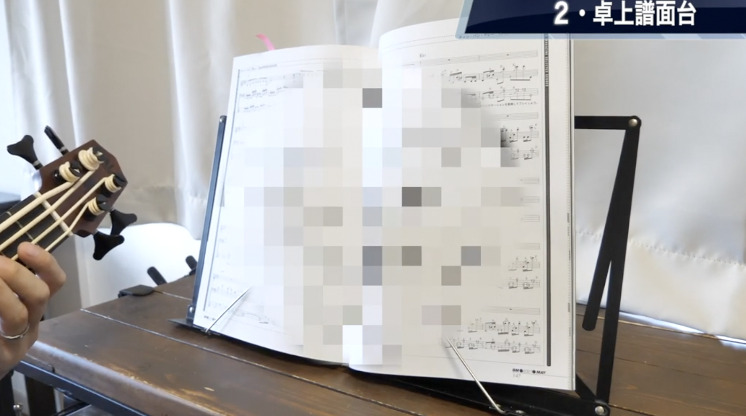
② Tabletop Music Stand

A small foldable music stand for using on a desk

Great if you’re someone whose method book or sheet music keeps snapping shut when you lay it flat on a table.

It holds the page open, so it’s handy if you want to check theory or sheet music while holding your instrument. Folds down compact when you’re done.

https://amzn.asia/d/0i3ZpBRx

③ Fret Wraps

A fret wrap that mutes string sustain on the neck of a bass

An item that shortens string sustain and gives you a stronger sense of mute.

Especially good if you like the sound of walking bass or an upright bass. Comes in plenty of color options too.

https://amzn.asia/d/0b97xyRX

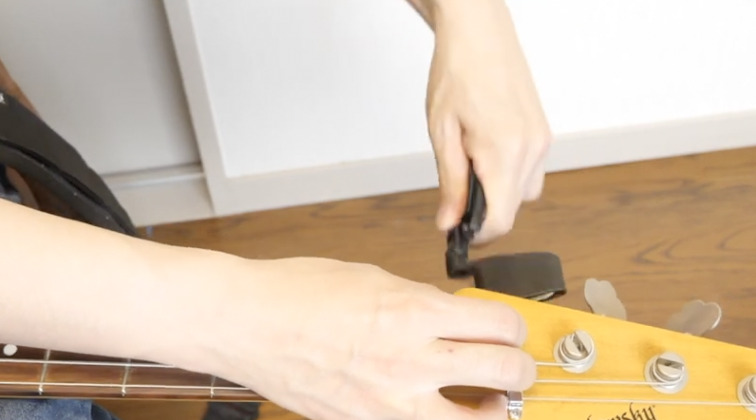
④ String Winder

A hand-crank string winder tool for changing bass strings

A hand-crank tool for winding strings.

It’s dramatically faster than winding by hand, saving time and sparing your fingers. Worth having if you find changing strings to be a hassle.

https://amzn.asia/d/0fWZK5BJ

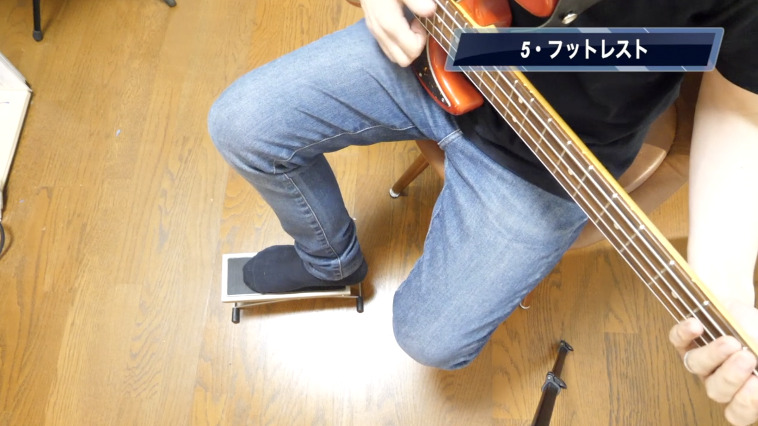
⑤ Footrest

An adjustable footrest for use while sitting and playing bass

Raising one foot slightly while playing seated helps the instrument sit against your body more naturally, which stabilizes your form.

The height is fully adjustable, which makes it easy to find the posture that works best for you.

https://amzn.asia/d/04qpCLd8

⑥ String Life (String Cleaner/Conditioner)

A string conditioner that helps prevent rust and extend string life

Just wipe this onto your strings after practice to help prevent rust and extend their life.

Since it slows down tonal degradation, it ends up reducing how often you need to change strings, too.

https://amzn.asia/d/0dXb09H2

Every one of these is affordable, but each can meaningfully improve your practice environment and overall playing comfort. If you want to boost your practice motivation or just enjoy playing a bit more, give a few of these a try.

Good gear removes friction — but a teacher catching what’s actually limiting your playing is what moves the needle the most.

Want Personalized Feedback on Your Playing?

This is exactly the kind of thing that’s hard to fix alone — and where having a teacher makes all the difference.

At Line on Bass, I offer an online lesson service where you send me a video of your playing, and I give you specific, detailed feedback — every single day if you want.

Students from around the world are using this to fix exactly these kinds of issues and steadily improve their jazz bass skills.

Check Out the Lesson Service →