This article is written by Toru Hoshino, a jazz bassist and instructor based in Japan who teaches online lessons to students worldwide. In this article, he shares two drills using iReal Pro that specifically target the “losing your place” problem.
iReal Pro — a backing-track app for jazz — is something I’ve personally used for over ten years. It’s incredibly convenient, but the feedback I hear most often is:
“I can play along fine with iReal Pro, but I completely lose my place in a real session.”
To be fair, the tension level of playing relaxed at home versus improvising live with strangers is completely different, so it’s no surprise the results aren’t the same. Still, if you’re going to use a convenient tool, you might as well use it efficiently — so here are two practice methods that help.
Both of these make practicing with iReal Pro noticeably harder, but they make for genuinely great practice.
Contents
1. Turn Off the Playback Indicator
The “playback indicator” is the feature that shows you exactly which chord the song is currently on.
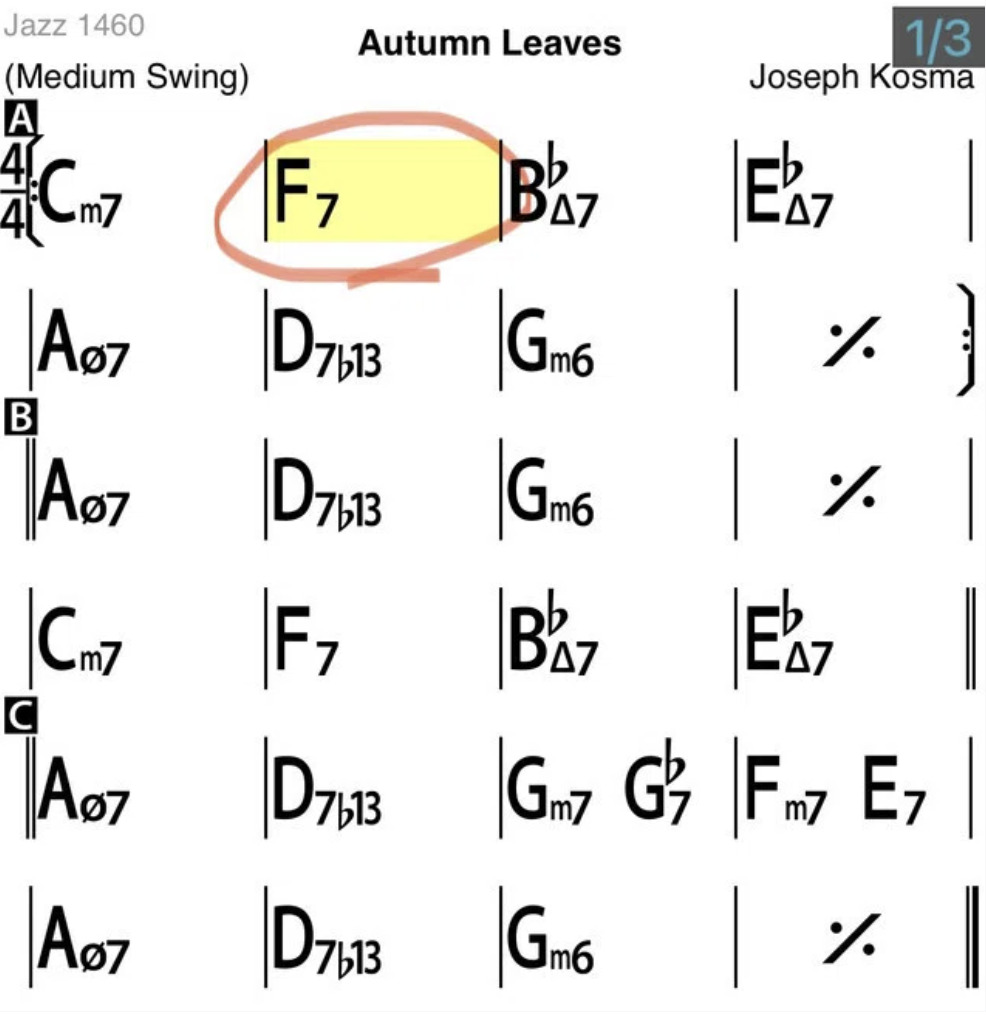
Since it’s constantly showing your current position in the chart, it’s pretty hard to actually get lost. But in a real performance, you obviously don’t get that kind of helpful indicator.
So turning the indicator off brings your practice conditions a little closer to the real thing. Open any tune, tap the letter display at the top of the screen, and turn off the “Playback Position” setting.
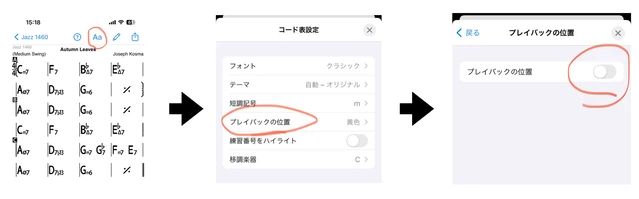
This makes practicing noticeably harder, but it’ll build real skill.
2. Mute the Bass and Drums
Muting the bass and drums leaves you with just piano or guitar comping.
Practice playing your bass line or solo against just that. With no rhythm section backing you, the entire rhythmic responsibility falls on you alone — which is exactly what builds your internal sense of time.
On top of that, piano or guitar comping doesn’t always land squarely on beat 1, so just figuring out where the bar lines and beats actually are becomes its own challenge.
Open any tune, tap the mixer icon at the bottom of the screen, and turn off “Bass” and “Drums.”
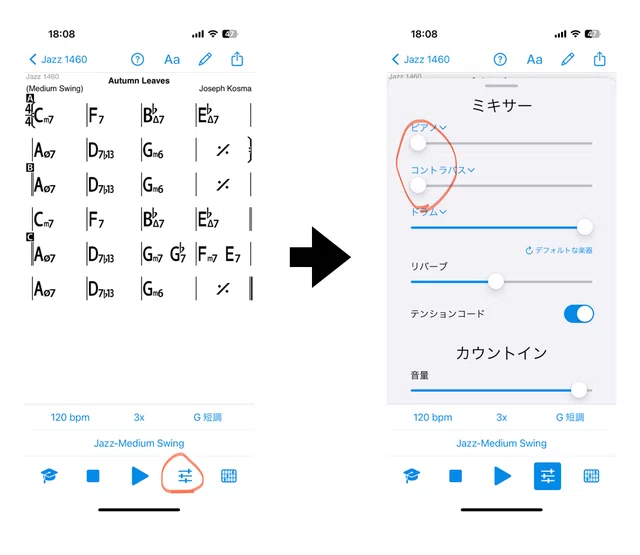
This makes things considerably harder too, but it’s great training.
At the end of the day, avoiding getting lost really does require real-world reps and experience — but it’s still worth squeezing every bit of value out of the tools available to you.
Drilling this kind of focus on your own is great — but knowing whether you’re actually staying locked to the time, rather than just feeling like you are, is exactly what a teacher’s ear can confirm.
Want Personalized Feedback on Your Playing?
This is exactly the kind of thing that’s hard to fix alone — and where having a teacher makes all the difference.
At Line on Bass, I offer an online lesson service where you send me a video of your playing, and I give you specific, detailed feedback — every single day if you want.
Students from around the world are using this to fix exactly these kinds of issues and steadily improve their jazz bass skills.